The title plays on “Attention is all you need”, the paper that introduced the transformer architecture for language models. This is first part of a two part series. This part is my intuitions on performance economics of local LLM inference and how it differs from cloud inference. Primarily covers why memory capacity matters more than speed, and what features local LLM engines need that cloud doesn't. The second part is an experiment on prefill optimization that benefits local LLMs in Apple Silicon.
This post was not written by LLMs. Generative AI tools were only used for research, glossary and image generation. Why? Because LLM written text creates a “No one wrote it, No one read it” situation.
Glossary
Readers new to LLM inference terminologies are suggested to read the glossary first.
Click to expand
| Term | Description |
|---|---|
| Token | A chunk of text (roughly a word or word fragment) that the model reads and writes. |
| Weights | The billions of learned numbers that make up a model. |
| Inference | Running a trained model to get output, as opposed to training it. |
| Inference engine | The software that loads a model and runs it. |
| Open-weight model | A model whose weights are published so anyone can run it. |
| Prefill | The first phase: the model processes your entire input prompt at once. |
| Decode | The second phase: the model writes its answer one token at a time. |
| TTFT (time to first token) | How long you wait before the answer starts appearing. This is another metric for prefill speed as the first token will appear once decode starts.. |
| GEMM / GEMV | Matrix × Matrix and Matrix × Vector multiplications. |
| Compute-bound | Speed is limited by how fast the chip can do math. |
| Memory-bound | Speed is limited by how fast data can be read from memory. |
| Memory bandwidth | How much data per second can move between memory and the processor. |
| VRAM | Fast memory attached to a discrete GPU card. |
| Unified memory | CPU and GPU share one pool of memory instead of having separate pools. |
| Quantization | Storing weights with fewer bits (for example 4-bit instead of 16-bit). |
| Dequantization | Expanding quantized weights back to a wider format for the math. |
| KV cache | Saved intermediate results for earlier tokens, so they aren't recomputed each turn. |
| Batching | Processing several users' requests together. |
| Continuous batching | Adding and removing requests from a batch on the fly as they finish. |
| Speculative decoding | A small model drafts several tokens, and the big model verifies them in one pass. |
| Tensor / pipeline parallelism | Splitting one model across multiple machines: tensor splits the math within each layer, pipeline splits the layers into stages. |
| AMX | A matrix-math coprocessor built into Apple CPUs. |
| ANE (Apple Neural Engine) | Apple's dedicated neural-network accelerator. |
| NAX (Neural Accelerator) | Matrix units built into the GPU cores of newer M5 chips. |
Not Cloud, Not Edge
Local LLM inference has become a practical option in 2026 in terms of both hardware and models. Unified memory architecture (UMA) platforms have greatly reduced the cost of hardware needed for running local LLMs. Apple Silicon overwhelmingly dominates this segment followed by “AI” workstation alternatives like NVIDIA’s DGX Spark and AMD’s Strix Halo. Alongside, the open-weight models are only months behind the frontiers. Personally, I find open-weight models very capable when used as sub-agents, orchestrated by a frontier model. Apart from cost, local LLMs are a great option for privacy conscious users.
In his recent talk, Greg Kroah-Hartman, the maintainer of Linux kernel stable branch, mentioned using local LLM models for kernel development and encouraged other kernel contributors to do the same [Security in the LLM age - Kernel recipes]. People buy expensive “desktop” hardware to self host LLMs. Personally, I don’t consider such setups as edge inference. Although close, the on-device edge inference focuses more on a different set of challenges. Resource and thermal constrained mobile phones cannot be compared to a $40,000 worth of Mac studios connected using Thunderbolt RDMA.
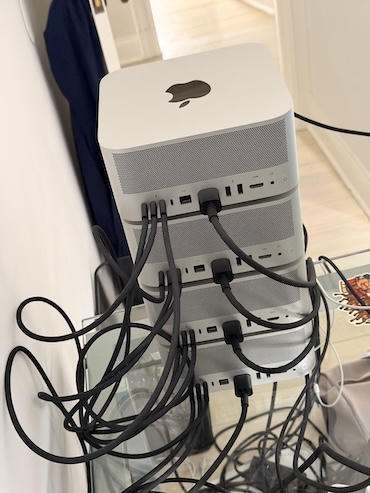
Source: X.com post
A desktop cluster with 2TB memory (4 x 512GB Mac Studio) can load Kimi K3.1 Pro, the largest open weight model (as of writing this) with 2.8 trillion total parameters at 4-bit quantization. Such hardware for self hosting LLMs cannot be considered as edge, nor cloud. I choose to call them “desktop inference” until there is a better terminology.
An open-weight model publishes its layer schema and weights. Inference engine is the software that executes input tokens through the model layers and generates output tokens. Inference engines like vLLM are designed for the cloud. On the other hand, LiteRT-LM is an inference engine designed for edge. Inference software designed for both use cases are converging as well. For example, vLLM has a plugin to support Metal backend (Apple Silicon). Likewise, the LiteRT-LM has grown to support Macbooks. While both vLLM and LiteRT-LM are great options for local LLM, they still leave a gap for the desktop inference. There exist inference engines designed for desktop inference with features that only make sense for such self hosted LLM setups. Some examples are llama.cpp, Ollama, LM Studio. For Apple Silicon, we have MLX-LM, oMLX, Uzu, etc.
--
Let’s look at where desktop and edge inference differs from datacenter inference.
Trading speed for capacity
Like any computer program, LLM inference needs computation and memory. When running LLM inference, the model’s entire weights must reside in memory for computation. As the models are trending larger, more memory is needed to hold the weights. No surprise there, as they are literally named as “Large” Language Models. To generate a single token, the entire model’s weights must be read from memory which demands high memory bandwidth as well. Meanwhile, the computation for the attention and feed forward layers primarily include large GEMM (General Matrix-Matrix Multiplication) and GEMV (General Matrix-Vector Multiplication) operations. GPU cards are used for inference because of these reasons. Not only do they come with high bandwidth memory (VRAM), they also excel in large matrix multiplication because of their Single Instruction Multiple Threads (SIMT) nature.
While GPUs dominate cloud inference, the unified memory platforms provide a much lower entry point to local LLMs in terms of cost. Instead of lower-end versions of datacenter GPUs (desktop GPU cards), local LLM inference is shifting towards a different memory architecture. The desktops and workstations designed for “AI” workloads, such as NVIDIA DGX Spark and AMD Strix Halo, use unified memory to keep the entrypoint lower. Unified memory has existed for decades in mobile phones. Apple introduced it in laptops and desktops with its M-series chips.
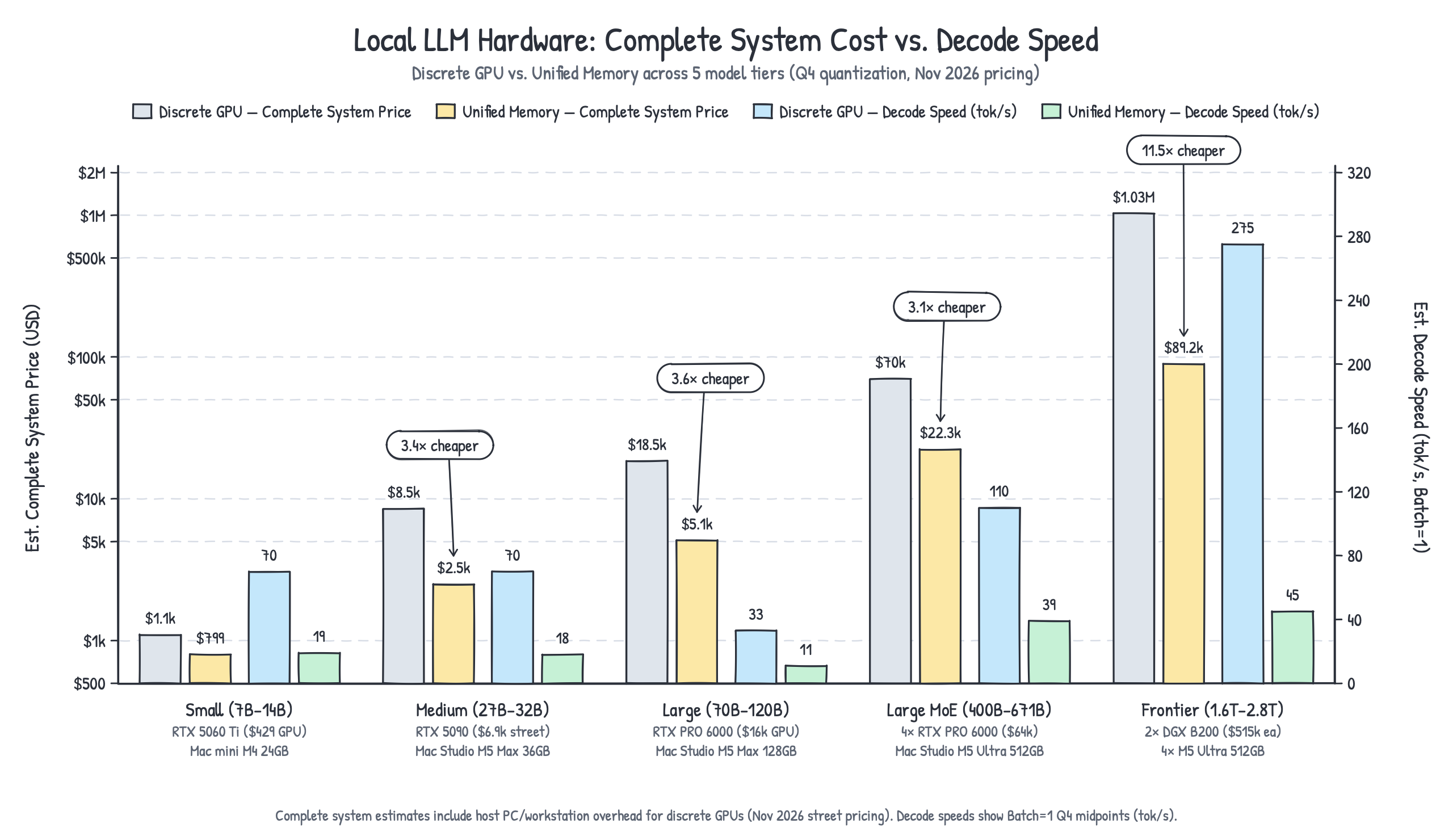
I have put together a chart showing price estimates with the help of LLMs themselves. The numbers are a rough estimate, but they convey the idea of how speed is sacrificed for more memory so that larger models can be fit. For fitting frontier models, the unified memory hardware costs one tenth of the price compared to graphics memory cards.
*Note that the prices are in log scale while the decode speed is shown in linear scale.
Now that we have established unified memory provides a cheaper entrypoint, let’s look at the reason behind it. A PCIe GPU card comes with its own memory, often called Video RAM (VRAM). This is required because if the GPU reads data directly from system RAM through a PCIe bus, it would spend way more time waiting for data to arrive than computing it. For VRAM, data center GPUs use High Bandwidth Memory (HBM3e) which accounts for roughly 60% of the hardware cost. Consumer or desktop GPU cards use relatively less expensive Graphics Double Data Rate (GDDR) memory chips which still have higher bandwidth compared to system RAM. But what good is memory bandwidth if you cannot fit the entire LLM weights into VRAM in the first place?
Unified memory architecture trades the memory bandwidth and compute to have more memory capacity. In unified memory architecture, the CPU, GPU and LPDDR memory are soldered onto a single package. This means the GPU can directly access system RAM without going through PCIe. LPDDR memory chips are cheaper compared to graphics memory chips. Additionally, we are not paying for separate system RAM and VRAM anymore. The entire memory that we pay for (minus some buffer for OS) can act like a VRAM, slower, but still usable as a VRAM as it is sitting next to the GPU. For these two reasons, the unified memory is much cheaper per gigabyte. Unified memory basically puts SIMT cores close to the existing system RAM.
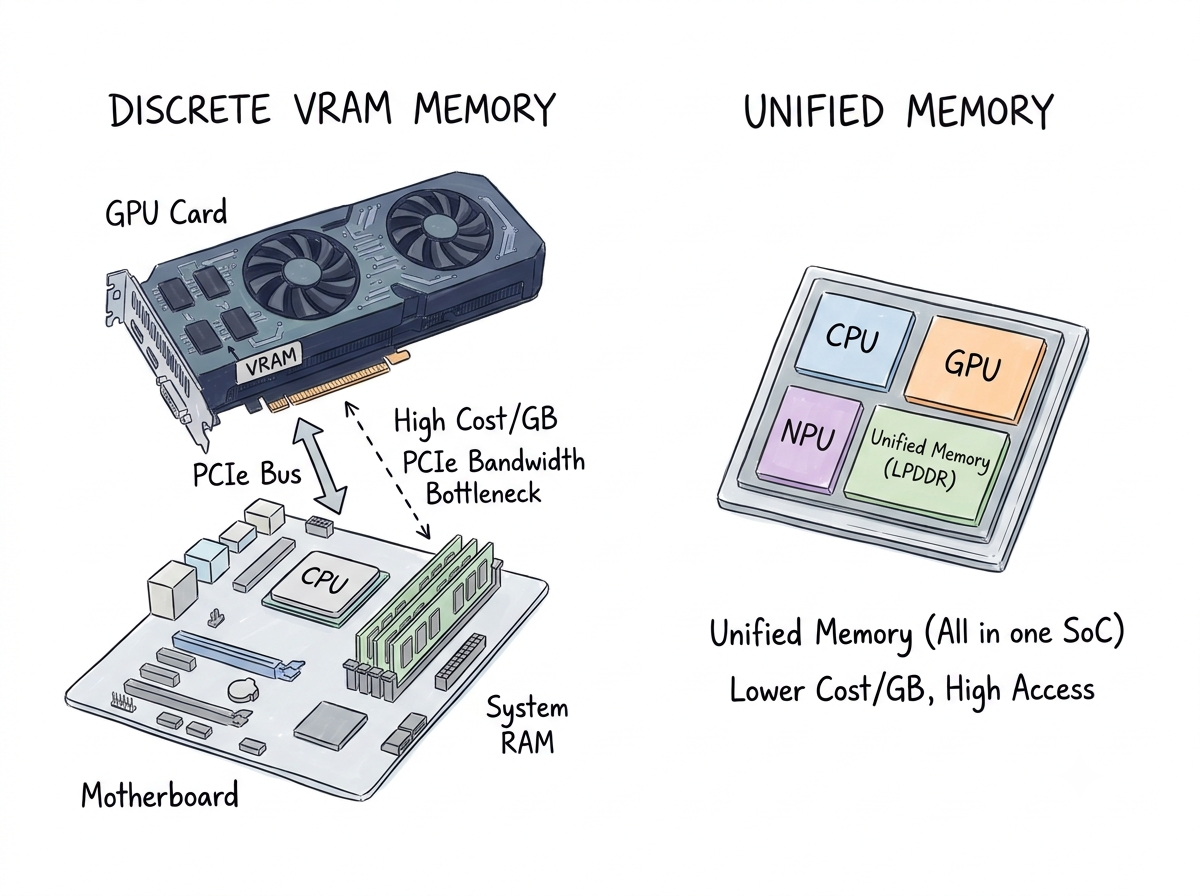
AI generated image
The term "Unified Memory" is not to be confused with the software abstraction provided by CUDA that exposes both system RAM and VRAM as single memory to programmers.
Well, there is no free lunch. Unified memory systems are not as flexible as traditional desktops. For starters, memory capacity cannot be expanded by adding more RAM sticks later. The entire SoC must be replaced when any component fails. Moreover, top end Apple M5 Max chips still have lower memory bandwidth compared to desktop RTX GPU cards. The token generation speed is dictated by how fast weights can be read from memory rather than how fast the GPU can calculate. This is why we say token generation is memory bound. A GPU card with dedicated graphics memory still wins by a huge margin on speed. Having said that, unified memory is a nice sweet spot in between CPU only inference and GPUs with dedicated graphics memory.
Cloud amortizes the GPU cost by batching multiple user sessions concurrently. Remember, GPUs are great at parallelism. Model weights read from memory once are used to calculate tokens for multiple independent sessions. However, for single user desktop inference, the unified memory provides much much lower hardware cost. Because you must fit the LLM weights into memory and have some headroom for activations, trading compute speed for cheaper memory makes economical sense.
Note that there are other datacenter accelerators such as TPU, LPU, etc., designed for neural networks or matrix multiplication specifically. Edge inference also benefits from TPUs (Pixel phones) and NPUs (ANE in Mac and iPhones). The unified memory does translate to them in the same manner.
Crossing the memory wall
Now that we have traded off hardware memory bandwidth, it is on the inference software to compensate for better user experience. LLM inference operates in two stages – prefill and decode. The prefill phase is when the input prompt is processed and decode is when output tokens are generated. The prefill is compute bound while decode is memory bound.
In simple terms, a token is a vector and the model's layer weights are matrices. During prefill, all input tokens are available and hence multiple token vectors can be batched together into a matrix. Prefill results in multiple large GEMM (matrix-matrix multiplication) operations. On the other hand, decode happens one token at a time. The LLM can generate the next token only after the current token is generated. This is what we call an autoregressive generation. This is bad for GPUs, the compute units are only performing GEMV (matrix - vector multiplication) and every single token needs entire model weights to be streamed from memory, again and again. The compute units are underutilized and decode speed is decided by the memory bandwidth - the memory wall.
For dense models, generating a single output token requires reading entire model weights from memory into GPU's cache. The theoretical limit of token generation speed is calculated as
decode speed (tok/s) = Memory bandwidth / Model size. A Macbook M4 with ~120GB/s memory bandwidth running a ~5GB model (~9B parameters at 4-bit quantization) can theoretically generate a maximum of ~24 tokens every second.
Cloud inference uses continuous batching to overcome this limitation. Multiple decode sessions from different users are batched. In fact, it is common to perform prefill and decode in different GPU nodes as they have different performance properties. Higher batching for decode to amortize the memory throughput while a lower batching is used for compute bound prefill. This is what we call disaggregated serving.
For single user desktop LLM inference, the number of concurrent sessions are typically one or two for a single model. Hence, the desktop inference needs to look elsewhere for amortizing the decode memory cost. There are techniques such as speculative decoding which uses a smaller draft model to generate multiple tokens ahead so that the larger model can verify multiple future tokens in one forward pass. Although speculative decoding is used in cloud inference engines, some desktop engines take this to the next level as they need it more. Uzu is an inference software for Apple Silicon. Uzu speculates 16-32 tokens in future compared to 2-3 tokens in cloud engines like vLLM. Essentially verifying 16-32 tokens costs nearly the same as decoding one token.
Quantization, how low can you go?
This is one area where the cloud and local LLM inference have got closer. In simple terms, quantization compresses the model weights into lower precision with minimal quality loss. Smaller model size means less memory needed to fit and faster to read from memory. Local LLM inference have used 4-bit weights for a long time while cloud inference relied on FP8 (8-bit) or FP16 (16-bit) floating points.
In mid-2025, NVIDIA introduced NVFP4 (a 4-bit quantization) along with native hardware support for 4-bit arithmetic in Blackwell GPUs. Since then, cloud inference has shifted to NVFP4. Desktop inference also uses a wide variety of 4-bit quantization schemes depending on the hardware platform. Desktop inference has motivation to go even lower up to 2-bit or even 1-bit weights accepting a quality loss. Samsung research recently even published a sub-1-bit quantization as well.
--
Everything we have discussed so far applies to both desktop and edge inference. Now it is time to discuss some niche features that only desktop inference engines care to provide.
Large models
Edge inference engines focus more on smaller models. For instance, LiteRT-LM supports only up to 26B models. The largest open-weight model as of now is 2.8T (yes, trillion parameters). Larger models are supported by engines designed for desktop inference (Ollama, LM Studio, MLX, etc). Models that do not fit in a single machine require support for an inference cluster with tensor parallelism or pipeline parallelism.
In dense LLM models, each token passes through all its layers. In Mixture of Experts (MoE) models, the tokens are routed through only a few experts. This allows the MoE to be faster while having broad knowledge. Beyond 500B, all open weight models are Mixture of Experts. So are the most proprietary models likely to be. In the sub 100B range, dense models dominate because of their deep reasoning and uniform behavior over context length. Dense models become less practical beyond 500B parameters as they demand more compute and memory bandwidth.
As desktop inference engines focus on large models as well, they support MoE offload. MoE offloading trades off even more compute speed for memory. Some experts of the MoE model are offloaded to the next memory tier when the entire model cannot fit in the memory. This means experts are offloaded to system RAM when using graphics memory. In unified memory, experts are offloaded to SSDs. Only the hot experts are kept in the working memory.
Cold, Colder and Coldest Prompt Cache
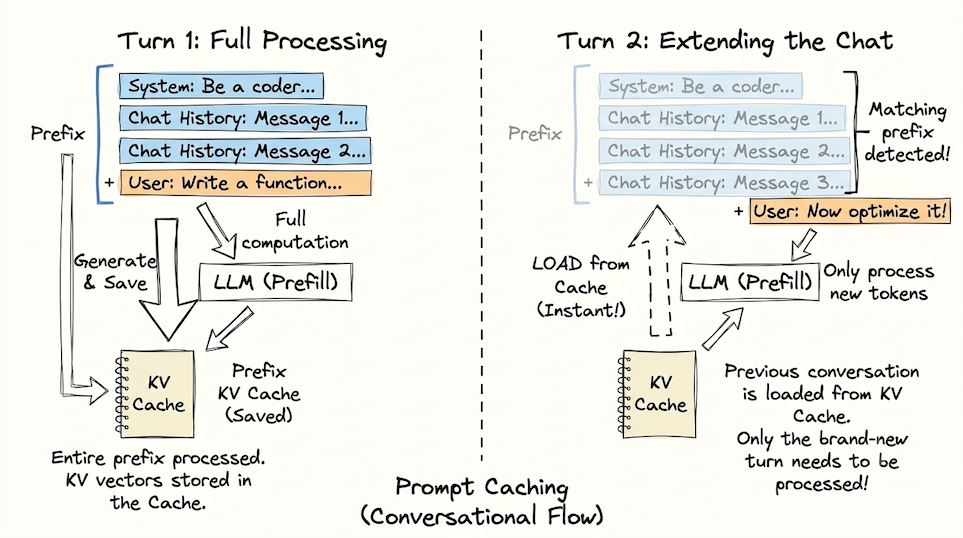
LLM inference is stateless by default. A followup question in the same conversation generates a new request with all prior content as input.
AI generated image
Now, imagine a multi-turn agentic session. It will be very inefficient to prefill the entire conversation again and again every time a new user message comes. Hence, the intermediate outputs (Key and Value vectors) in the attention layers are cached for each session (KV-cache). When new user query comes in existing conversation, only the new input tokens need to be processed with prefill.
Note that the prompt cache is different from conversation history. The conversation history is saved by the chat or agent client. A conversation's KV cache is saved by the LLM inference stack itself. It is a prefix-based memoization of intermediate model computations.
Cloud inference APIs typically offer 5-min to 1-hour of prompt cache persistence. Input tokens are priced differently (~90% less typically) depending on whether they are cached or not. This means resuming a chat or agentic session after the cache timeout (let’s say an hour of inactivity) costs more money. Once the prompt KV cache is evicted, the entire conversation need to be processed from beginning.
Desktop inference engines, like oMLX, offer features to save the KV cache to even SSDs. This means the KV cache persists for days, even across reboots. In local setups, this also benefits new chat/agent sessions as the system prompt often results in a cache hit. Cold persistence of KV cache accumulates a large amount of SSD usage so that chat sessions can be resumed later. I have not seen persistent KV cache in any inference engine designed for small edge devices.
Cold KV-cache in SSD helps to skip repeated prompt prefills. A fresh prompt still gets starved for compute, especially on base level chips with low GPU FLOPS.
Looking beyond GPU
Inference engines designed for edge devices have long focused on running small models entirely in power efficient on-device accelerators such as TPU, NPU, etc. Desktop inference engines dealing with larger models have primarly focused on custom GPU kernels for performance.
A relatively recent idea for larger models is to split the compute bound prefill across GPU and other hardware accelerators. In a dedicated desktop inference setup without other workloads, the CPU can be also pushed instead of being left underutilized. This works great in unified memory architecture. The CPU and all the accelerators, including the GPU, have access to the same memory. As far as I have searched, oMLX is the only inference engine for Apple Silicon that provides experimental support for utilizing Apple Neural Engine (ANE) during prefill.
Remember prefill needs more compute, hence the split. Decode needs more memory bandwidth and it does not make sense to throw more compute power at it. Part 2 of this post delves into my shot at implementing the prefill split across CPU, GPU and NPU in Apple Silicon.
Takeaways
- Self hosted LLM inference needs its own focus: It's neither cloud nor edge. Unified memory trades bandwidth and compute for memory capacity. The engineering focus shifts for inference engines: fit bigger models, make up for slow decode with speculative decoding, and avoid repeated prefill with persistent KV caches.
- Prefill and decode need different fixes: Decode is limited by memory bandwidth, and extra compute won't help it. Prefill is compute-bound, so combining multiple accelerators can help. Splitting large matrix multiplication across GPU, CPU and Neural Engine gave a 2.78x prefill speedup for Qwen3.5-9B running on a Macbook M4 Air. More details in Part 2.